

back
Building an MIS Agent for Decision Makers
Product discovery, AI workflow design, Interaction design, Usability testing, Frontend implementation
Overview

What started as a familiar enterprise request: custom dashboards for leadership teams who needed business insights beyond conventional reporting. But traditional dashboards felt like the wrong abstraction for the problem. Instead of designing yet another analytics interface, I proposed an AI-native Management Information System (MIS) Agent where leadership could ask business questions in natural language, generate insights conversationally, and create personalized dashboards dynamically.
What made this project particularly unique was execution. Beyond designing the experience, I personally built the frontend prototype through AI assisted vibe coding (LLM used: Claude), reducing frontend development effort by nearly 70% and significantly accelerating product delivery.
The Challenge

Leadership teams often need highly contextual business insights, not static reporting templates.
The original requirement focused on custom dashboards for C-level users, but the deeper challenge was flexibility. No fixed dashboard could realistically anticipate every business question leadership might ask.
This created a familiar product tension:
Do we keep expanding dashboard complexity, or rethink the interaction model entirely?
Diagnosis Before Design

I started by understanding how leadership users currently consume information, what decisions they make, and where conventional reporting falls short.
Through empathy mapping and workflow analysis, a few patterns emerged:
- leadership questions are rarely static
- insight needs are contextual and evolving
- dashboard filters often create interaction friction
- users care more about answers than navigating analytics interfaces
This shifted the problem framing significantly.
The better question became:
What if users could simply ask for what they need instead of navigating dashboards?
That insight became the foundation of the agent.
Reframing the Product

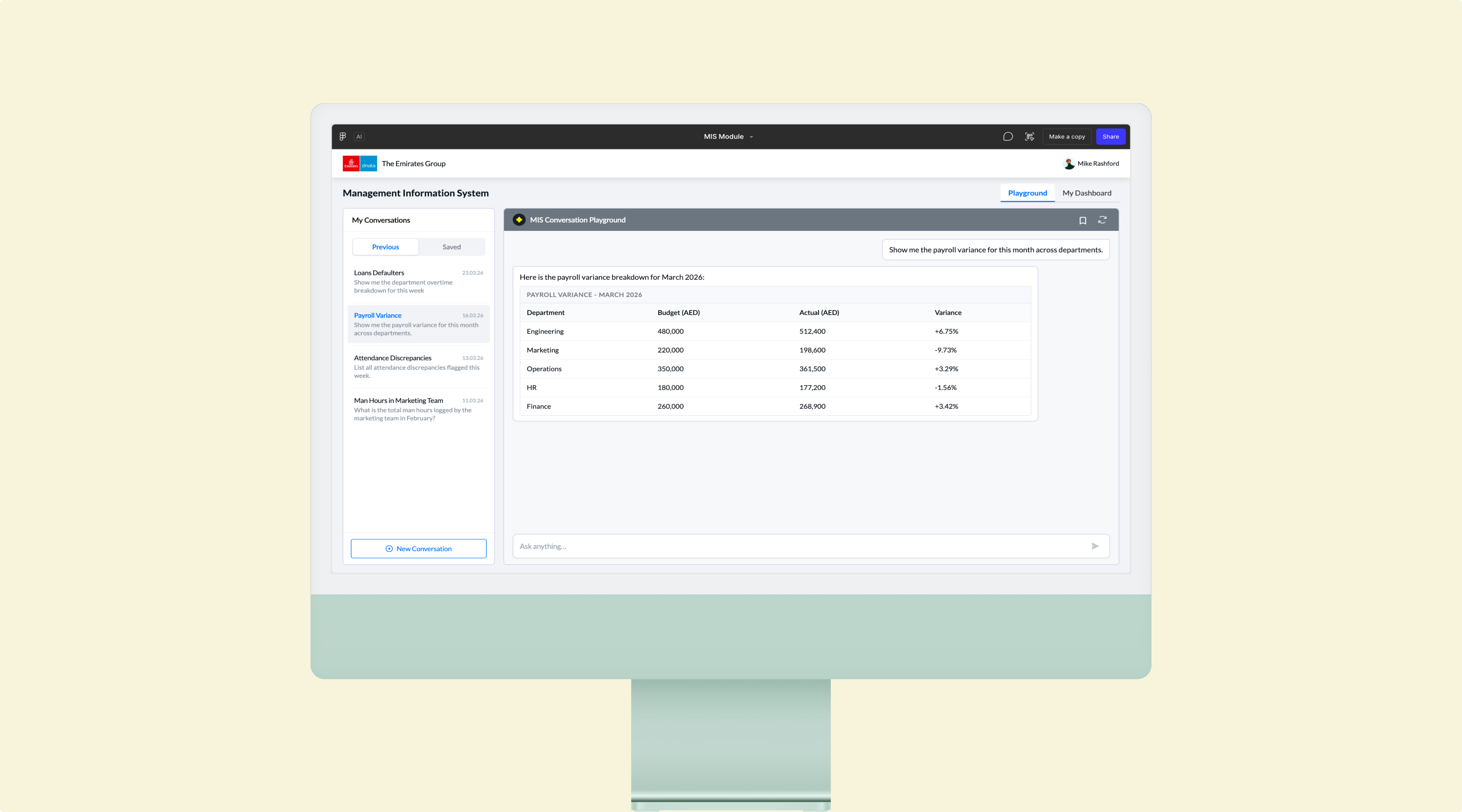
Instead of building another dashboard layer, I proposed an AI agent that functioned as a conversational business intelligence interface.
Essentially, a ChatGPT-like experience inside Perk HRMS, purpose-built for organizational intelligence.
The concept was accepted after collaborative discussions with stakeholders and engineering around:
- technical feasibility
- AI orchestration
- token cost implications
- delivery effort
- long-term product viability
This moved the conversation from feature implementation to product innovation.
Designing the Experience - Conversational Playground

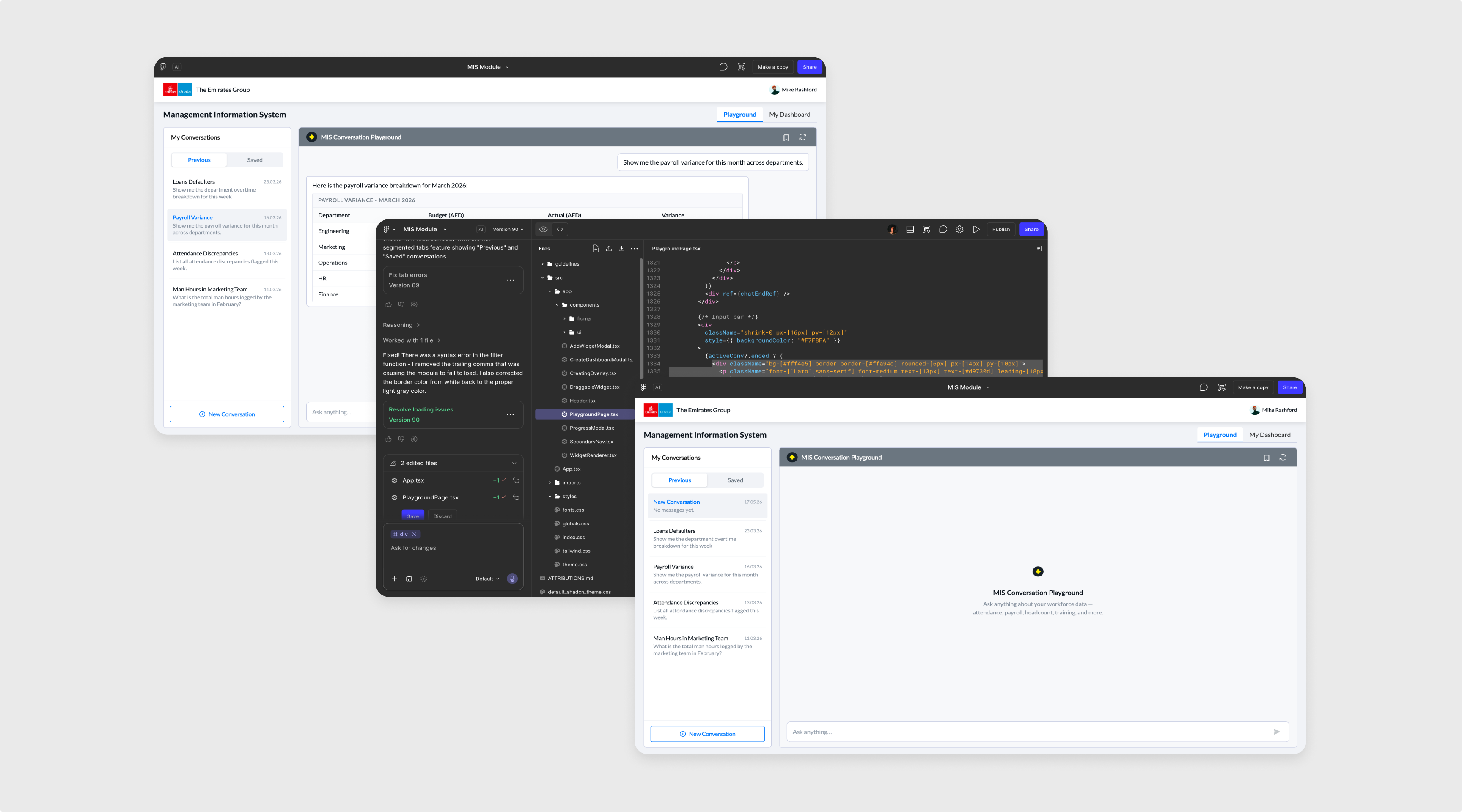
A natural language interface where users could ask questions, explore organizational insights, and interact conversationally with the system.
Examples:
“Show attrition trend for marketing team over the last 6 months”
“Which departments have the highest absenteeism this quarter?”
“Compare payroll variance between regions”
The goal was reducing interaction cost and replacing rigid dashboard workflows with natural language exploration.
Designing the Experience - Dynamic Custom Dashboards

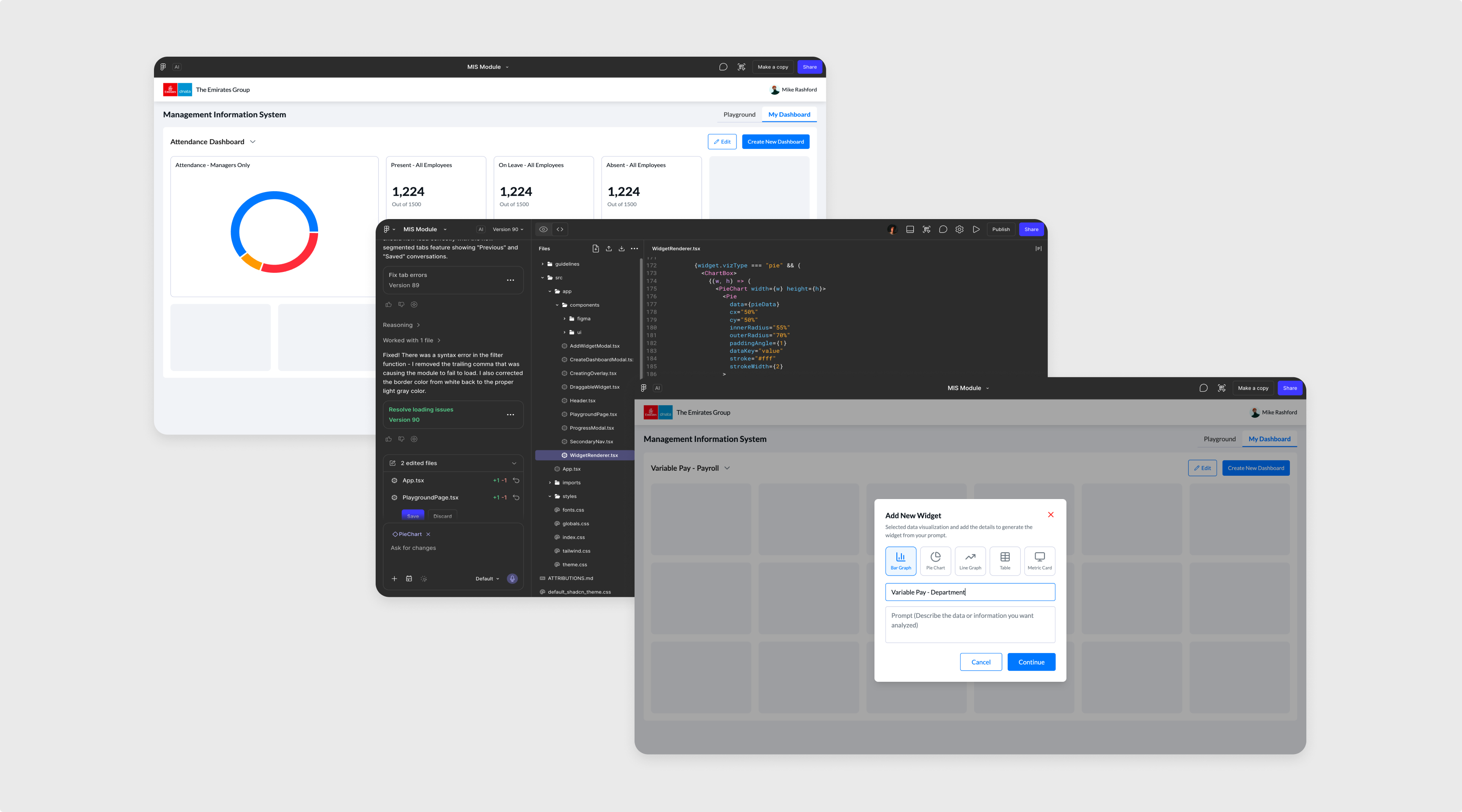
A second layer allowed users to convert conversational insights into persistent dashboards.
Users could:
- create dashboards from AI-generated outputs
- manually customize layouts
- define widgets
- personalize how information is structured
This balanced AI convenience with enterprise expectations for control.
Execution Beyond Design

This was the most unconventional part of the project. Instead of stopping at design handoff, I personally built the frontend prototype.
Using an AI-driven workflow with Claude, connected to my Figma design system through MCP, I created a context aware coded prototype that maintained consistency with the broader product system.
I manually designed a couple of foundational mockups first to establish interaction direction, then moved into rapid AI assisted frontend iteration.
This approach significantly reduced frontend engineering effort, accelerated iteration cycles, and allowed much faster design-validation loops than a traditional handoff model.
I also defined the product’s conversational voice guidelines, establishing communication principles around:
- Proactively Transparent
- Thoughtful and Helpful
- Human yet enterprise appropriate language
Validation and Iteration

Since backend integration was still incomplete, usability testing happened through guided prototype sessions using dummy data. Even in this constrained setup, the sessions surfaced important insights.
One particularly valuable learning was around the meaning of “custom dashboards.”
While I initially interpreted customization as configurable insight widgets, users expected deeper interaction freedom, closer to tools like HubSpot or Notion, including:
- drag-and-drop layouts
- widget resizing
- greater dashboard composition control
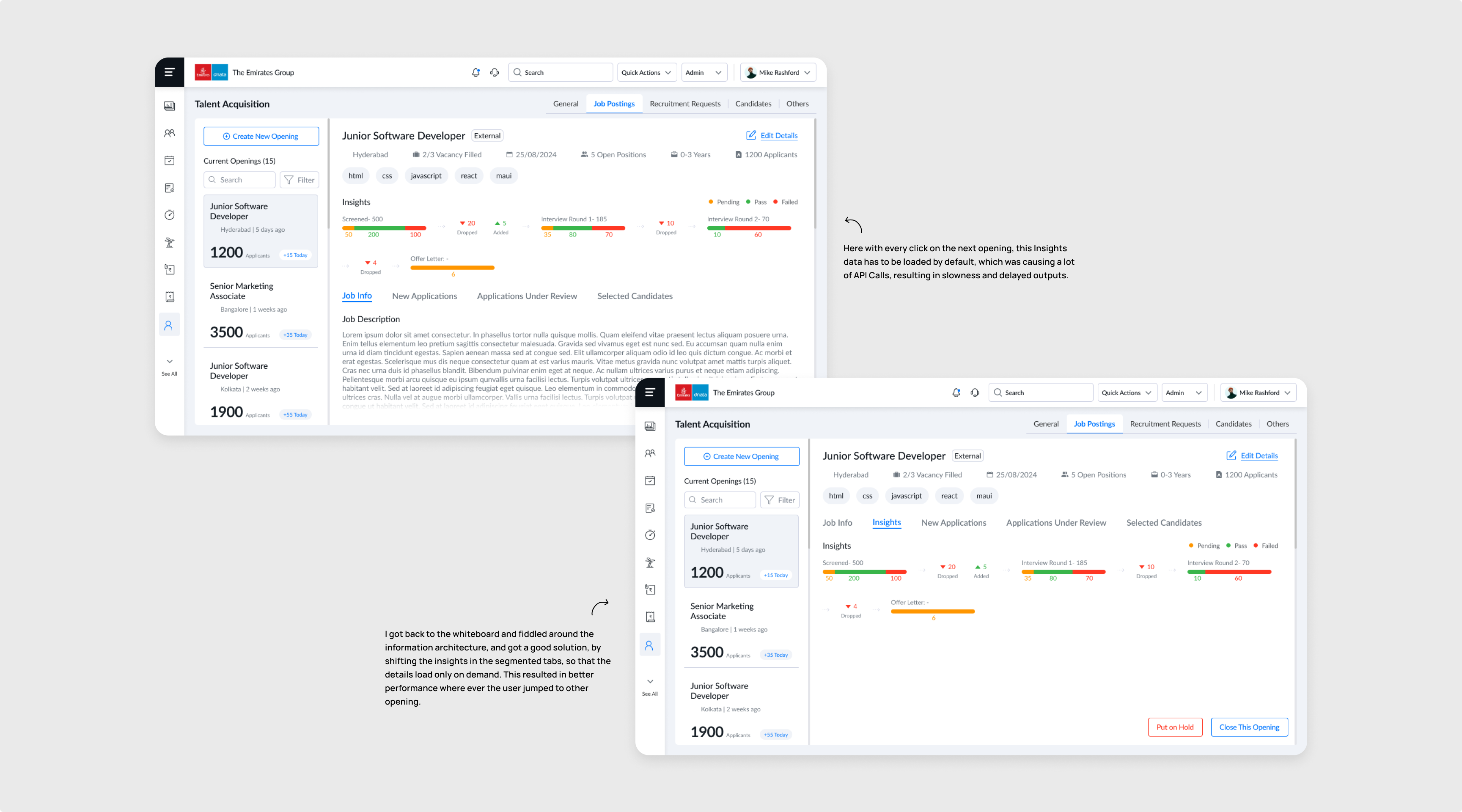
This was a strong correction. Rather than defending the initial interpretation, I iterated directly in the coded prototype and expanded dashboard customization capabilities accordingly.
That iteration significantly improved alignment between product assumptions and user expectations.
Expected Impact

The product is currently in active backend development, with launch expected soon.
However, immediate internal impact was already significant:
- Reduced frontend development effort by nearly 70% through designer led AI assisted implementation
- Faster design-to-validation cycles through coded prototyping
- Stronger stakeholder confidence through interactive prototypes instead of static mockups
Expected product impact:
- dramatically lower interaction cost for business intelligence workflows
- increased executive adoption of analytics features
- stronger product differentiation through AI-native enterprise workflows
What I Learnt

This project fundamentally changed how I think about product design.
I learned that modern product design increasingly extends beyond interface creation into workflow orchestration, rapid prototyping, and even implementation acceleration. It also reinforced the importance of adapting with the industry. AI is not just a feature to design for. It is also a tool that changes how products get designed and built.
Most importantly, I learned where automation helps and where human control remains essential.
Open to new challenges, let’s connect.


Building an MIS Agent for Decision Makers
Product discovery, AI workflow design, Interaction design, Usability testing, Frontend implementation
Overview

What started as a familiar enterprise request: custom dashboards for leadership teams who needed business insights beyond conventional reporting. But traditional dashboards felt like the wrong abstraction for the problem. Instead of designing yet another analytics interface, I proposed an AI-native Management Information System (MIS) Agent where leadership could ask business questions in natural language, generate insights conversationally, and create personalized dashboards dynamically.
What made this project particularly unique was execution. Beyond designing the experience, I personally built the frontend prototype through AI assisted vibe coding (LLM used: Claude), reducing frontend development effort by nearly 70% and significantly accelerating product delivery.
The Challenge

Leadership teams often need highly contextual business insights, not static reporting templates.
The original requirement focused on custom dashboards for C-level users, but the deeper challenge was flexibility. No fixed dashboard could realistically anticipate every business question leadership might ask.
This created a familiar product tension:
Do we keep expanding dashboard complexity, or rethink the interaction model entirely?
Diagnosis Before Design

I started by understanding how leadership users currently consume information, what decisions they make, and where conventional reporting falls short.
Through empathy mapping and workflow analysis, a few patterns emerged:
- leadership questions are rarely static
- insight needs are contextual and evolving
- dashboard filters often create interaction friction
- users care more about answers than navigating analytics interfaces
This shifted the problem framing significantly.
The better question became:
What if users could simply ask for what they need instead of navigating dashboards?
That insight became the foundation of the agent.
Reframing the Product

Instead of building another dashboard layer, I proposed an AI agent that functioned as a conversational business intelligence interface.
Essentially, a ChatGPT-like experience inside Perk HRMS, purpose-built for organizational intelligence.
The concept was accepted after collaborative discussions with stakeholders and engineering around:
- technical feasibility
- AI orchestration
- token cost implications
- delivery effort
- long-term product viability
This moved the conversation from feature implementation to product innovation.
Designing the Experience - Conversational Playground

A natural language interface where users could ask questions, explore organizational insights, and interact conversationally with the system.
Examples:
“Show attrition trend for marketing team over the last 6 months”
“Which departments have the highest absenteeism this quarter?”
“Compare payroll variance between regions”
The goal was reducing interaction cost and replacing rigid dashboard workflows with natural language exploration.
Designing the Experience - Dynamic Custom Dashboards

A second layer allowed users to convert conversational insights into persistent dashboards.
Users could:
- create dashboards from AI-generated outputs
- manually customize layouts
- define widgets
- personalize how information is structured
This balanced AI convenience with enterprise expectations for control.
Execution Beyond Design

This was the most unconventional part of the project. Instead of stopping at design handoff, I personally built the frontend prototype.
Using an AI-driven workflow with Claude, connected to my Figma design system through MCP, I created a context aware coded prototype that maintained consistency with the broader product system.
I manually designed a couple of foundational mockups first to establish interaction direction, then moved into rapid AI assisted frontend iteration.
This approach significantly reduced frontend engineering effort, accelerated iteration cycles, and allowed much faster design-validation loops than a traditional handoff model.
I also defined the product’s conversational voice guidelines, establishing communication principles around:
- Proactively Transparent
- Thoughtful and Helpful
- Human yet enterprise appropriate language
Validation and Iteration

Since backend integration was still incomplete, usability testing happened through guided prototype sessions using dummy data. Even in this constrained setup, the sessions surfaced important insights.
One particularly valuable learning was around the meaning of “custom dashboards.”
While I initially interpreted customization as configurable insight widgets, users expected deeper interaction freedom, closer to tools like HubSpot or Notion, including:
- drag-and-drop layouts
- widget resizing
- greater dashboard composition control
This was a strong correction. Rather than defending the initial interpretation, I iterated directly in the coded prototype and expanded dashboard customization capabilities accordingly.
That iteration significantly improved alignment between product assumptions and user expectations.
Expected Impact

The product is currently in active backend development, with launch expected soon.
However, immediate internal impact was already significant:
- Reduced frontend development effort by nearly 70% through designer led AI assisted implementation
- Faster design-to-validation cycles through coded prototyping
- Stronger stakeholder confidence through interactive prototypes instead of static mockups
Expected product impact:
- dramatically lower interaction cost for business intelligence workflows
- increased executive adoption of analytics features
- stronger product differentiation through AI-native enterprise workflows
What I Learnt

This project fundamentally changed how I think about product design.
I learned that modern product design increasingly extends beyond interface creation into workflow orchestration, rapid prototyping, and even implementation acceleration. It also reinforced the importance of adapting with the industry. AI is not just a feature to design for. It is also a tool that changes how products get designed and built.
Most importantly, I learned where automation helps and where human control remains essential.
Open to new challenges, let’s connect.

Overview
Challenge
Diagnosis
Reframing
Design 1
Design 2
Execution
Iteration
The Impact
What I Learnt

Building an AI MIS Agent for Decision Makers
Product discovery, AI workflow design, Interaction design, Usability testing, Frontend implementation
Overview

What started as a familiar enterprise request: custom dashboards for leadership teams who needed business insights beyond conventional reporting. But traditional dashboards felt like the wrong abstraction for the problem. Instead of designing yet another analytics interface, I proposed an AI-native Management Information System (MIS) Agent where leadership could ask business questions in natural language, generate insights conversationally, and create personalized dashboards dynamically.
What made this project particularly unique was execution. Beyond designing the experience, I personally built the frontend prototype through AI assisted vibe coding (LLM used: Claude), reducing frontend development effort by nearly 70% and significantly accelerating product delivery.
The Challenge

Leadership teams often need highly contextual business insights, not static reporting templates.
The original requirement focused on custom dashboards for C-level users, but the deeper challenge was flexibility. No fixed dashboard could realistically anticipate every business question leadership might ask.
This created a familiar product tension:
Do we keep expanding dashboard complexity, or rethink the interaction model entirely?
Diagnosis Before Design

I started by understanding how leadership users currently consume information, what decisions they make, and where conventional reporting falls short.
Through empathy mapping and workflow analysis, a few patterns emerged:
- leadership questions are rarely static
- insight needs are contextual and evolving
- dashboard filters often create interaction friction
- users care more about answers than navigating analytics interfaces
This shifted the problem framing significantly.
The better question became:
What if users could simply ask for what they need instead of navigating dashboards?
That insight became the foundation of the agent.
Reframing the Product

Instead of building another dashboard layer, I proposed an AI agent that functioned as a conversational business intelligence interface.
Essentially, a ChatGPT-like experience inside Perk HRMS, purpose-built for organizational intelligence.
The concept was accepted after collaborative discussions with stakeholders and engineering around:
- technical feasibility
- AI orchestration
- token cost implications
- delivery effort
- long-term product viability
This moved the conversation from feature implementation to product innovation.
Designing the Experience - Conversational Playground

A natural language interface where users could ask questions, explore organizational insights, and interact conversationally with the system.
Examples:
“Show attrition trend for marketing team over the last 6 months”
“Which departments have the highest absenteeism this quarter?”
“Compare payroll variance between regions”
The goal was reducing interaction cost and replacing rigid dashboard workflows with natural language exploration.
Designing the Experience - Dynamic Custom Dashboards

A second layer allowed users to convert conversational insights into persistent dashboards.
Users could:
- create dashboards from AI-generated outputs
- manually customize layouts
- define widgets
- personalize how information is structured
This balanced AI convenience with enterprise expectations for control.
Execution Beyond Design

This was the most unconventional part of the project. Instead of stopping at design handoff, I personally built the frontend prototype.
Using an AI-driven workflow with Claude, connected to my Figma design system through MCP, I created a context aware coded prototype that maintained consistency with the broader product system.
I manually designed a couple of foundational mockups first to establish interaction direction, then moved into rapid AI assisted frontend iteration.
This approach significantly reduced frontend engineering effort, accelerated iteration cycles, and allowed much faster design-validation loops than a traditional handoff model.
I also defined the product’s conversational voice guidelines, establishing communication principles around:
- Proactively Transparent
- Thoughtful and Helpful
- Human yet enterprise appropriate language
Validation and Iteration

Since backend integration was still incomplete, usability testing happened through guided prototype sessions using dummy data. Even in this constrained setup, the sessions surfaced important insights.
One particularly valuable learning was around the meaning of “custom dashboards.”
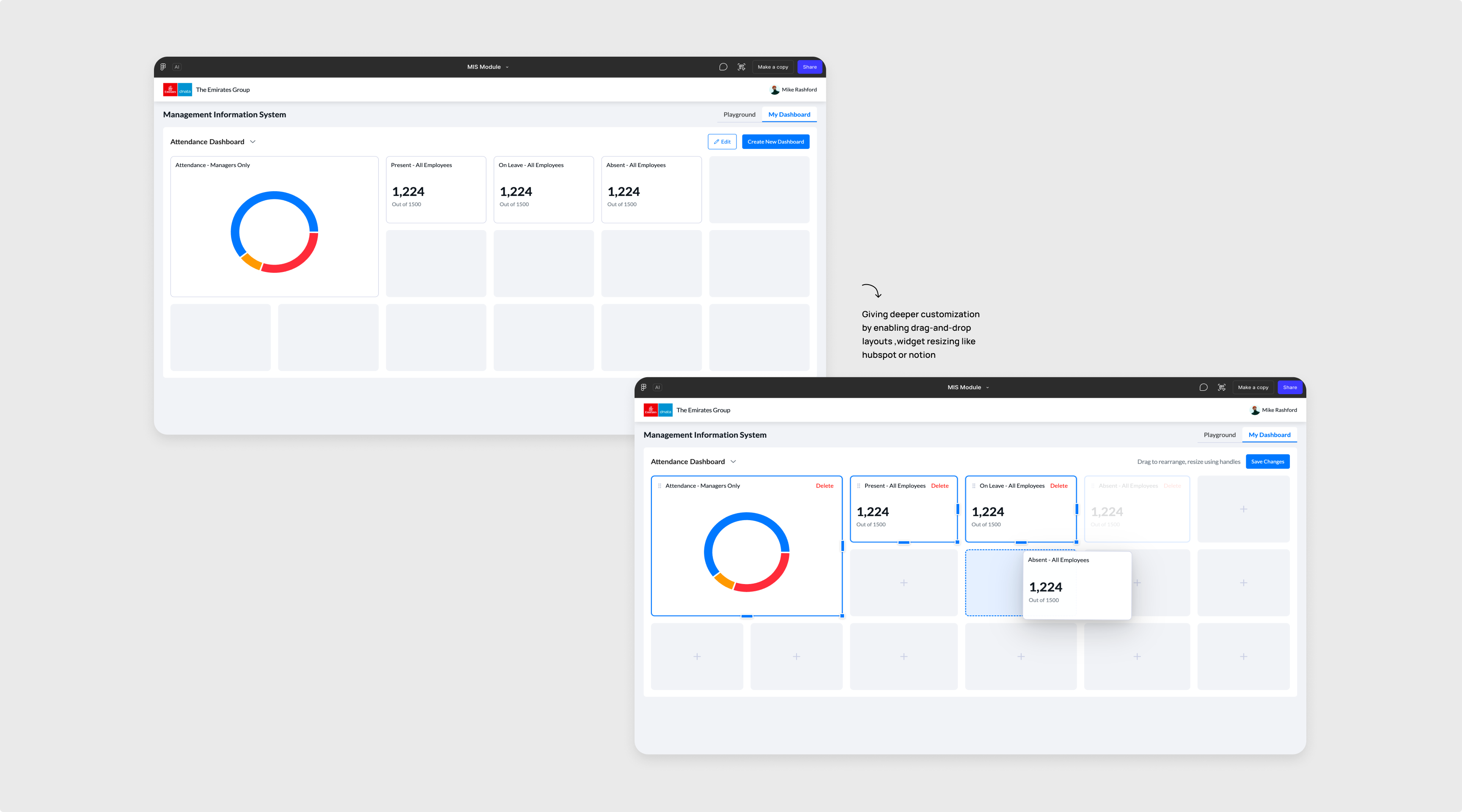
While I initially interpreted customization as configurable insight widgets, users expected deeper interaction freedom, closer to tools like HubSpot or Notion, including:
- drag-and-drop layouts
- widget resizing
- greater dashboard composition control
This was a strong correction. Rather than defending the initial interpretation, I iterated directly in the coded prototype and expanded dashboard customization capabilities accordingly.
That iteration significantly improved alignment between product assumptions and user expectations.
Expected Impact

The product is currently in active backend development, with launch expected soon.
However, immediate internal impact was already significant:
- Reduced frontend development effort by nearly 70% through designer led AI assisted implementation
- Faster design-to-validation cycles through coded prototyping
- Stronger stakeholder confidence through interactive prototypes instead of static mockups
Expected product impact:
- dramatically lower interaction cost for business intelligence workflows
- increased executive adoption of analytics features
- stronger product differentiation through AI-native enterprise workflows
What I Learnt

This project fundamentally changed how I think about product design.
I learned that modern product design increasingly extends beyond interface creation into workflow orchestration, rapid prototyping, and even implementation acceleration. It also reinforced the importance of adapting with the industry. AI is not just a feature to design for. It is also a tool that changes how products get designed and built.
Most importantly, I learned where automation helps and where human control remains essential.
Open to new challenges, let’s connect.


